AYEONE FREE DESIGNS APPLIQUE FREE PATTERNS  AYEONE WORLD
EMBROIDERY DRAW FREE STUFF FREE THINGS MORE FREE DESIGNS
GENERATIONS BASICS FREE LESSONS GENERATIONS IN OZ GENERATION LES CD 1
GENERATION LES CD 2 GENERATIONS LES CD 3  GIGA HOOP DESIGNS FREE DESIGNS
GIGA HOOP DESIGNS 2 FREE DESIGNS GIGA HOOP DESIGNS 3 FREE DESIGNS GIGAHOOP DESIGNS 4 FREE DESIGNS
HEIRLOOM DESIGN FREE DESIGNS  HOME PAGE JANOME 11000 FREE DESIGNS
JANOME 11000 PAGE 2  FREE DESIGNS JANOME 11000 3 FREE DESIGNS JANOME 6500 FREE STUFF
LINKS PR 600 LARGE FREE DESIGNS PR 600 LARGE2 FREE DESIGNS
PR 600 LARGE 3 FREE DESIGNS QUILTING PAGE 1   QUILTING PAGE 2  
QUILTING PAGE 3 (NEW) REDWORK CENTRAL 1 FREE DESIGNS REDWORK CENTRAL 2  FREE DESIGNS
SLASH MY STASH FREE LESSON SPIRAL QUILT FREE DESIGNS WINTOPO FREE LESSONS
ZONER DRAW FREE LESSONS ZONER DRAW CD 1 ZONER DRAW 2 FREE LESSONS
AYEONE FREE DESIGNS APPLIQUE FREE PATTERNS  AYEONE WORLD

ZONER DRAW LESSONS

This Zoner Draw Lesson shows you how to use the Mehdi Kaleidoscope Plugin. This Plugin can be used with Zoner Draw Versions 4 and 5

Download the Plugin from here: http://www.mehdiplugins.com

Make a folder on your hardrive i.e. My Plugins
Unzip the kaleidoscope file into this folder.

Open Zoner Draw
Select View - Preferences - Plugins

Click - Add
Find the My plugin folder and it will appear on the plugin menu.
Click OK

Now to test it:
Draw a flower shape on the work area. Black outline - width .50mm
Colour - None
Select Tools - Rasterize - 2 colors (this will change the image to a
raster image)
Select - Bitmaps - Edit transparency
Use the magic wand to remove the background from the flower.
Click OK.

Next select - Bitmaps - Mehdi - Kaleidoscope.
Move the sliders on the menu to get the effect you want.
Click OK

You can now use this as a template for your lace designs.
 

You can use the kaleidoscope images to make some interesting Lace Images.

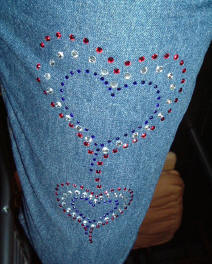
The Lessons also includes cutting out areas of your images and the use of Zoner Draw to make background images to use with the Crystal Clear Transfer Paper.

Click on the Link to watch the videos in YOUTUBE

http://www.youtube.com/watch?v=3vw8AtVZJzk

http://www.youtube.com/watch?v=VPTqu9-4b8M

http://www.youtube.com/watch?v=7EwpA5Ey1Qg

http://www.youtube.com/watch?v=Katdp1jR9a8

Samples of simple kaleidoscopes  

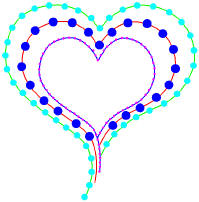
An image drawn ready to use for crystal work